Home > Product > PLC programmable module > 00-291-556 robot teaching pendant

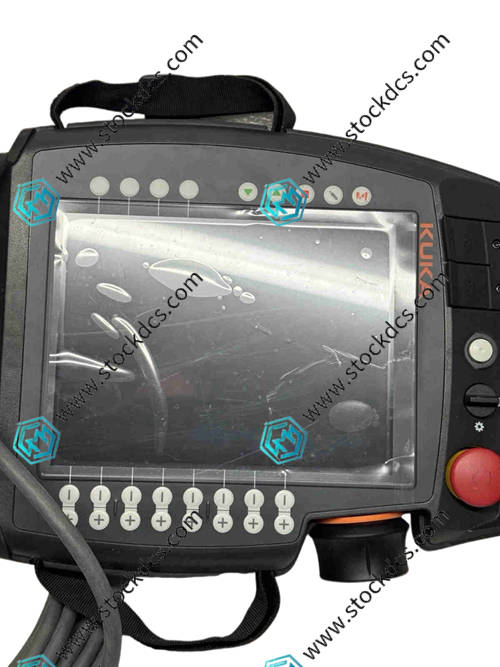
00-291-556 robot teaching pendant
- Goods status: new/used
- Delivery date: stock
- The quality assurance period: 365 days
- Phone/WhatsApp/WeChat:+86 15270269218
- Email:stodcdcs@gmail.com
- Tags:00-291-556
- Get the latest price:Click to consult
00-291-556 robot teaching pendant
Product Details Introduction
Precautions for using the 00-291-556 robot teaching pendant
Before operating the teaching pendant, remove the metal jewelry from your hands to avoid touching the terminals and causing a short circuit, while also preventing scratches on the casing and screen.
When holding the teaching pendant, grip the anti slip area to avoid swinging with one hand or falling from a height, and prevent the internal circuit board solder joints from falling off.
When connecting the teaching pendant cable, align it with the interface buckle, gently push it into place, and then lock it. It is strictly prohibited to forcefully plug or unplug to cause the interface pins to bend.
Check the cables for any damage or breakage, and avoid the robot's movement trajectory during wiring to prevent them from being pinched or crushed.
Before turning on the teaching pendant, confirm that the robot is in "manual mode" and the emergency stop button is in the pop-up state to avoid triggering automatic operation by mistake.
When touching the screen, use fingertips to lightly touch it. Do not press with sharp objects such as nails or screwdrivers to prevent the screen from shattering or touch failure.
When programming or modifying parameters, save each completed step in a timely manner to avoid losing the program or parameters due to power failure.
When debugging the robot's motion, first adjust the speed to low gear, confirm that the direction of motion is correct, and then gradually increase the speed.
The teaching pendant should be used in a dry environment, avoiding use in damp, dusty, and oily places to prevent liquids or dust from entering the interior.
It is strictly prohibited to stack heavy objects on the teaching pendant, avoid direct sunlight on the screen, and prevent screen aging or residual images.
If there are any abnormalities such as screen flickering or unresponsive buttons during operation, immediately press the emergency stop button and turn off the power for inspection.
When cleaning the teaching pendant, first disconnect the power supply, wipe the outer shell with a soft cloth dipped in a small amount of water, and use a specialized screen cleaner for the screen.
Charge the battery in a timely manner when the battery level is low to avoid excessive discharge affecting the battery life; When not in use for a long time, it needs to be charged once a month.
It is prohibited to dismantle the outer shell of the teaching pendant without authorization. Non professional maintenance of the internal precision circuits and sensors may cause secondary damage.
When storing teaching devices, they should be placed in a dedicated protective box and kept in a ventilated and dry place to avoid mixing with corrosive chemicals.
Summary: The use of the 00-291-556 robot teaching pendant should focus on anti drop, anti short circuit, and anti misoperation protection, strictly follow the principle of manual low-speed debugging, pay attention to cable maintenance and battery maintenance in daily life, avoid risk behaviors such as sharp object scratches and live plugging, and ensure the sensitivity and service life of the teaching pendant, ensuring the safety of robot debugging and operation.
00-291-556 Product imag
00-291-556 ontroller Module
BENTLY 330180-90-05 Monitor module
SCHIELE DL42N-22 Analog module
DSDX452 5716075-P Digital module
Other website links
216VC62A HESG324442R13/E控制系统模块
HESG216876脉冲数字信号
216NG62A HESG441634R1K交流电源输入模块
| PMB31B-00101-03 | 07EB200 | N32HLHJ-LNK-NS-00 |
| PMB31B-00101-02 | NPSI02 | 57120001-HE DSAI 309 |
| PMB31B-00101-01 | NKAS11 | P21NSXS-LSS-NS-05 |
| PMB31B-00101-00 | AMAT 0100-91085 | PFTL101AER 2.0KN 3BSE023012R1 |
| PMB31B-00100-00 | INBIM02 | 57160001-PA DSDI 116 |
| PMB23C-00114-00 | INNPM01 | 57120001-RB DSTA 002 |
| PMB22D-10116-00 | 07EA62R1 | 3BSE005880R1 TK560 |