Home > Product > PLC programmable module > SPS10X300-K0E7 controller module
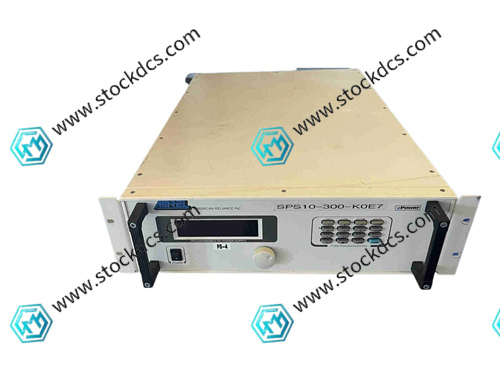
SPS10X300-K0E7 controller module
- Goods status: new/used
- Delivery date: stock
- The quality assurance period: 365 days
- Phone/WhatsApp/WeChat:+86 15270269218
- Email:stodcdcs@gmail.com
- Tags:SPS10X300-K0E7
- Get the latest price:Click to consult
SPS10X300-K0E7 controller module
Product Details Introduction
Precautions for using SPS10X300-K0E7 controller module
Wear an anti-static wristband throughout the entire process of module unpacking and installation to prevent static electricity from damaging the internal CPU and storage chip.
During installation, align the guide rail slot and gently push the clamp to ensure that the module is firmly in contact with the guide rail, preventing vibration and loosening.
Before wiring, check the terminal definition diagram, distinguish between power, input, and output ports, and strictly prohibit mixing to cause module burnout.
The power supply must meet the rated specifications of the module, and attention should be paid to the positive and negative polarity when wiring. Only after there is no reverse connection can the power be turned on.
Shielded cables are selected for digital input signal lines, while analog signals need to be separately wired and kept away from strong interference sources such as frequency converters.
When connecting the expansion module to the main module, it is necessary to operate in a power-off state to ensure that the communication bus connector is securely plugged in.
The operating environment temperature of the module is controlled between -10 ℃~55 ℃, with a relative humidity of 10%~90% and no condensation.
Before downloading programming parameters, backup the original program to avoid accidental operations that may overwrite important control logic.
After the first power on, observe the status of the running indicator light. If the indicator light flashes normally, proceed to the next step of debugging.
During debugging, gradually load the control program and test each functional module in sections to avoid faults caused by running at full load at once.
Do not plug or unplug communication cables or expand modules during module operation to prevent communication interruption or hardware damage.
Regularly check the screws of the module wiring terminals to prevent loosening that may cause signal fluctuations or unstable power supply.
When cleaning the dust on the surface of the module, the power should be turned off first, and a dry soft bristled brush should be used to gently sweep to avoid liquid entering the heat dissipation holes.
When the machine is shut down for a long time, disconnect the power supply of the module, take measures to prevent dust and moisture, and regularly power on for maintenance.
Non professionals are strictly prohibited from disassembling the module casing. When there is a malfunction, record the status of the indicator light and contact the manufacturer's technical support.
Summary: The use of the SPS10X300-K0E7 controller module should focus on anti-static protection, wiring specification verification, and anti-interference wiring. The debugging process should follow the principle of step-by-step testing, and daily maintenance should pay attention to terminal fastening and environmental control to avoid risky operations such as live plugging and illegal disassembly, which can ensure the stable operation and control accuracy of the module.
SPS10X300-K0E7 Product imag
SPS10X300-K0E7 ontroller Module
BENTLY 330103-00-03-05-02-05 Monitor cable
BENTLY 330108-91-05 Monitor module
BENTLY 330180-90-05 Monitor module
Other website links
8610-FT-NA工控燃机模块
HESG324442R112F模拟输入输出模块
216VC62A HESG324442R13/E控制系统模块
| PMB31B-00200-02 | AMAT 0100-00010 | PFTL301E 0.2KN 3BSE019050R200 |
| PMB31B-00200-01 | IMASI23 | P21NRXA-LSS-NS-02 |
| PMB31B-00200-00 | AMAT 0100-00013 | M22NRXB-LDN-NS-00 |
| PMB31B-00116-03 | IEFAN01 | M22NRXB-LNN-NS-00 |
| PMB31B-00116-02 | NIRL03 | PFTL201CE 10.0KN |
| PMB31B-00116-01 | 07XS80 | 1SAP180600R0001 |